Notifications

10 minutes, 41 seconds
-106 Views 0 Comments 0 Likes 0 Reviews
In today's fast-paced, tech-driven world, data centres and IT infrastructure are always on the lookout for compact, efficient, and reliable solutions to manage their resources. One such solution that has gained prominence is the rackmount monitor and rack mount monitor tray. These specialized monitors and trays allow seamless integration into standard server racks, providing system administrators and IT professionals with a convenient way to monitor multiple systems without sacrificing valuable rack space.
In this article, we'll explore the world of rackmount monitors and rackmount monitor trays, shedding light on their importance, benefits, and key features to help you make informed decisions for your IT setup.
What are Rackmount Monitors?
Rackmount monitors are specialized display units designed to fit into a standard 19-inch server rack. They are typically used in data centres, server rooms, and other mission-critical environments where space is limited, but functionality is essential. Unlike regular monitors, rackmount monitors are designed to be mounted horizontally or vertically in a rack unit (1U, 2U, etc.), which makes them ideal for managing multiple systems in a limited space.
Rackmount monitors come in various sizes, including 15-inch, 17-inch, and 19-inch displays, allowing businesses to choose the size that best fits their needs. They are available in different configurations, with options for touchscreens, high-definition displays, and even LED-backlit panels to improve visibility.
Why Choose Rackmount Monitors for Your Data Center?
Space Efficiency
The most obvious benefit of using rackmount monitors is the efficient use of space. In data centres where every inch counts, integrating monitors into server racks helps save valuable real estate. By using rackmount monitors, you eliminate the need for individual desktop displays, freeing up space for other essential equipment.
Easy Accessibility
Rackmount monitors are built for quick and easy accessibility. Instead of having to use a separate workstation to monitor multiple systems, IT professionals can quickly access the monitor via a built-in keyboard, mouse, or KVM switch. This makes them highly efficient for managing servers, routers, and other devices that require constant monitoring.
Durability
Data centres are high-traffic environments where equipment needs to withstand heavy use. Rackmount monitors are designed with durability in mind, featuring robust materials that can handle the rigours of constant use, vibrations, and fluctuating temperatures. These monitors are built to last and often come with features such as reinforced frames and shock-resistant construction.
Simplified Cable Management
With rackmount monitors, the need for messy cables and wires is minimized. These monitors are designed to integrate seamlessly with other rack-mounted equipment, including KVM switches and servers. This helps keep the wiring neat and organized, reducing clutter and improving airflow, which is crucial for maintaining optimal performance in data centres.
Understanding Rack Mount Monitor Trays
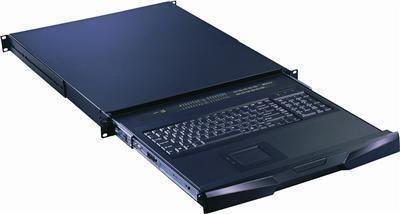
A rack mount monitor tray is a specialized device used to mount a monitor onto a standard server rack. It provides a stable platform for the monitor and often includes additional features like a built-in keyboard and mouse, offering a complete control solution for managing servers and network devices. These trays can be used to house a single monitor or can support dual-monitor configurations for more complex setups.
The main advantage of using a rack mount monitor tray is the ability to slide the monitor in and out of the rack when needed. This sliding feature is handy for IT professionals who need to access the monitor for maintenance or troubleshooting without removing the device from the rack.
Types of Rackmount Monitors
When choosing a rackmount monitor, it's essential to understand the different types available on the market. These can vary based on size, functionality, and mounting style.
1U Rackmount Monitors
A 1U rackmount monitor is a single-unit display designed to fit in the smallest possible space, typically taking up just 1U of rack space. These compact monitors are often equipped with integrated keyboards and KVM switches, making them a great all-in-one solution for controlling servers and other network devices. They are ideal for those who need a reliable yet space-saving solution.
2U Rackmount Monitors
A 2U rackmount monitor is slightly larger than the 1U version, offering more screen real estate and additional features. These monitors can support dual monitors, extended keyboards, and even integrated touch screens. 2U monitors are often used in environments where greater visibility and control are needed, such as monitoring large-scale server arrays or critical network infrastructure.
KVM Integrated Rackmount Monitors
KVM (keyboard, video, and mouse) integrated rackmount monitors combine all the features of a rackmount monitor and a KVM switch into one unit. These monitors are handy for IT professionals who need to control and monitor multiple servers from a single location. They allow administrators to control multiple servers via a single keyboard, mouse, and monitor, streamlining operations and improving workflow.
Touchscreen Rackmount Monitors
For environments that require interactive displays or where touch input is necessary, touchscreen rackmount monitors are a perfect solution. These monitors allow for intuitive control and can be used for a variety of applications, including network management, control rooms, and surveillance setups.
Key Features to Look for in Rackmount Monitors
When selecting a rackmount monitor or tray for your setup, it's essential to consider several key features to ensure that the solution meets your needs. Here are a few critical factors to look for:
Screen Size and Resolution
The size of the monitor plays a crucial role in how much data can be viewed at once. Larger screens with higher resolutions offer better visibility and allow you to monitor multiple systems simultaneously. Make sure the monitor you choose fits comfortably into your rack and provides the clarity you need.
Connectivity Options
Make sure the rackmount monitor offers the appropriate connectivity options for your setup. Most monitors come with standard VGA, HDMI, or DVI inputs, but some models may also provide DisplayPort or other specialized inputs. Choose a model with the right inputs to ensure compatibility with your existing systems.
Durability and Build Quality
Since rackmount monitors are often used in high-traffic, high-stress environments, it's essential to choose a monitor made from durable materials. Look for monitors that are built with reinforced steel frames, shockproof casings, and sealed components to withstand constant use and environmental fluctuations.
Ease of Installation
Installation should be straightforward, with clear instructions and an easy-to-mount design. Some rackmount monitors come with sliding trays, making installation and removal much simpler. If you're upgrading an existing setup, ensure that the monitor or tray is compatible with your current rack system.
Benefits of Using Rack Mount Monitor Trays
Maximized Space
By integrating a monitor directly into your server rack, you free up valuable desk and floor space. This is especially useful in environments like data centres, where real estate is at a premium.
Increased Efficiency
Rackmount monitor trays are designed for quick access, allowing IT professionals to monitor and control multiple systems without needing to leave their stations. This improves overall efficiency and response time, particularly in mission-critical environments.
Customizability
Many rackmount monitor trays come with customizable features, such as adjustable slides, foldable monitors, and integrated KVM switches. This flexibility allows businesses to tailor the setup to their exact needs.
Conclusion
Rackmount monitors and rackmount monitor trays offer a versatile, space-saving solution for businesses that require efficient and reliable monitoring tools. By integrating these monitors into server racks, companies can streamline their operations, reduce clutter, and improve system accessibility—all while saving valuable rack space.
Whether you're managing a small IT infrastructure or overseeing a large-scale data centre, a rackmount monitor and monitor tray can help you maintain control and visibility with minimal effort. Keep in mind the key features, such as screen size, durability, and ease of installation, to ensure you select the right model for your needs.


: Future-Proof Cryptography for a Quantum-Resistant World)


