Notifications

7 minutes, 44 seconds
-41 Views 0 Comments 0 Likes 0 Reviews
When you send a print job to your printer, have you ever been asked if you'd like to "collate" your prints? If you're unfamiliar with the term, it might sound a little confusing. But don't worry – in this article, we’ll break down exactly what collate means in printing, why it matters, and how it impacts your printed materials. Whether you're printing a set of documents, brochures, or multi-page reports, understanding collating is crucial for streamlining your workflow and ensuring everything is organized perfectly.
Let’s dive into the details of what collate means, and how this simple yet important step can make your print job easier and more efficient.
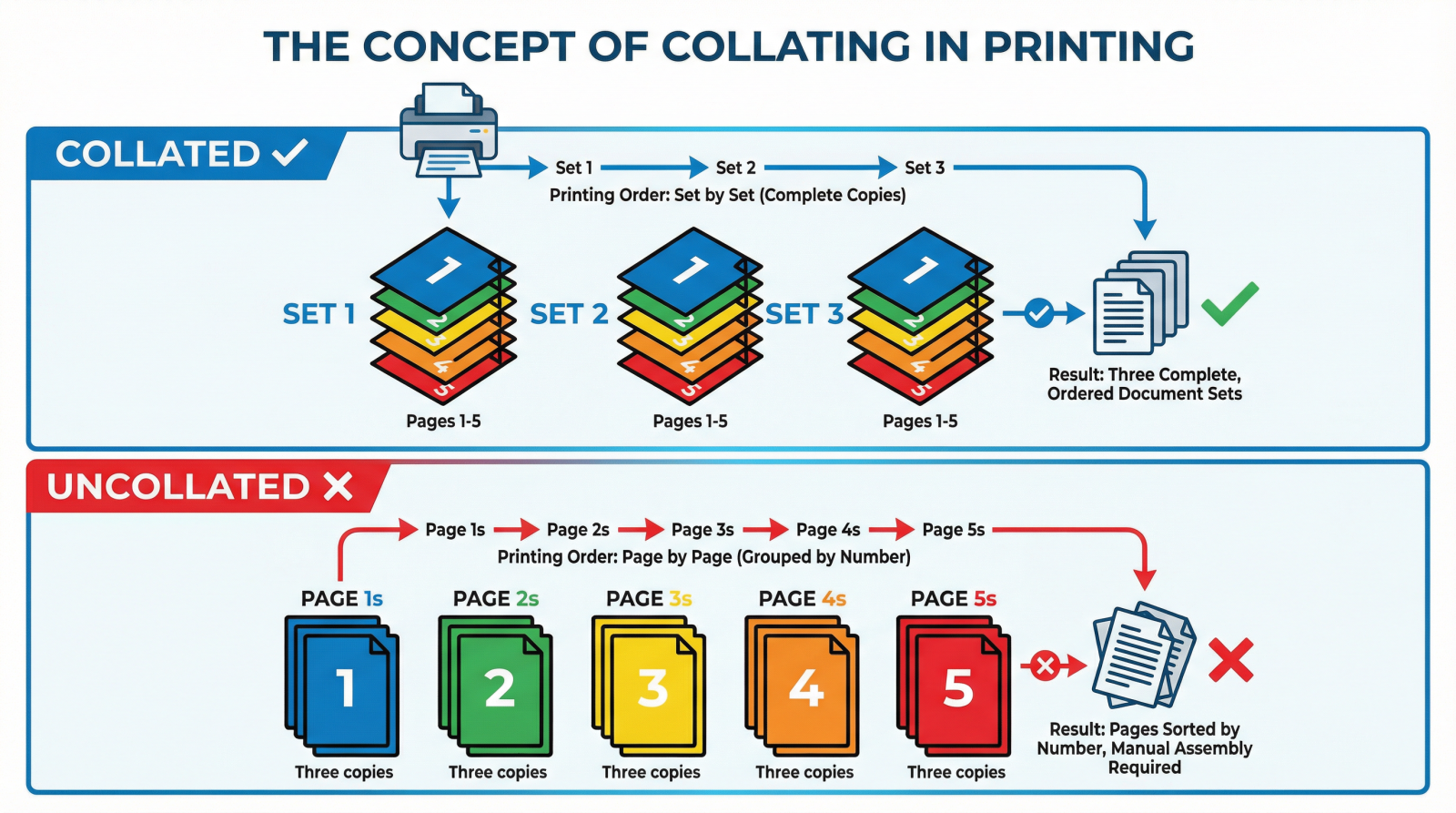
What does collate mean when printing. In printing, collating refers to the process of arranging pages or documents in a specific, sequential order. Essentially, when you collate your prints, you are ensuring that each set of printed materials is ordered correctly—whether that means organizing them page by page, in groups, or in the exact order required for assembly.
For example, imagine you’re printing 100 copies of a 10-page report. If you choose to collate your print job, each of the 100 reports will come out in the correct order, with pages 1 through 10 arranged in sequence for every set. Without collating, you might end up with all of the copies of page 1 printed first, followed by page 2, making it harder to assemble and organize the reports.
Collating offers several key advantages in both personal and commercial printing jobs. Here’s why it's so important:
Collating eliminates the need to manually organize and arrange printed materials after the printing process. This saves time and reduces errors, especially when printing large quantities.
For printed documents, such as reports, presentations, and manuals, collating ensures that every document is organized and looks professional, making it easier for clients or colleagues to read and follow.
For complex print jobs that require multiple pages in a specific order, collating helps ensure the pages are arranged as needed. This is especially useful when printing marketing materials, brochures, or multi-page catalogs.
Collating allows for customization of printed materials. You can choose to print all pages in one order or print certain sections separately and then collate them together, depending on the project’s needs.
Collate meaning printer. Collating can be done manually or automatically depending on the type of printer or copier you’re using. Here’s how it generally works:
In smaller print jobs or older printers, you might need to manually organize your printed sheets in the desired order. This is time-consuming but can be done in small volumes.
Most modern printers and copiers can automatically collate your prints. When you send a print job, the printer will organize the pages into complete sets and produce the documents in the correct order. Some printers even allow you to specify whether you want the prints in numerical or reverse order.
Collating can be done in different ways based on the type of print job and the desired outcome. Here are the common types of collating:
This is the most common form, where the printer arranges pages in numerical order. If you are printing a 10-page document and want 50 copies, you would get 50 complete, 10-page sets.
Reverse collating prints the last page first and the first page last. This can be helpful for stacking and binding materials where you want to assemble the document in reverse order.
This involves printing one set of pages in their entirety before moving on to the next set. For example, all copies of page 1 would be printed first, followed by page 2, and so on. This type of collating is often used in small, simple print jobs.
1. Why would I need to use collating?
If you’re printing multiple copies of a document with several pages, collating ensures that each copy is in the correct order. Without collating, you'll end up with pages out of order and have to manually arrange them.
2. Can I collate on any printer?
Most modern printers and copiers can perform automatic collating, especially those designed for office use or high-volume printing. However, some home printers may require manual collating.
3. What’s the difference between collating and sorting?
While collating arranges pages in a specific order for each set, sorting organizes multiple sets based on a particular criteria (like grouping all copies of a document together).
4. Does collating save time in large print jobs?
Yes, collating can save a lot of time in large print jobs by automating the organization process, reducing the need for manual assembly.
Collating is a vital part of the printing process that ensures your print job is organized, efficient, and professional. Whether you’re printing a small batch of documents or working on a large commercial print project, understanding what does collate mean and how it save you time and improve the final product’s quality.
Call to Action: Next time you’re printing multiple copies of a multi-page document, don’t forget to enable collating on your printer. Want to learn more about efficient printing tips? Contact your local printing service for expert advice on streamlining your print jobs.


